💡Ready to integrate AI into your team’s dbt workflows? We’re launching a brand new dbt with AI -course. Contact us to learn more!
1. Introduction
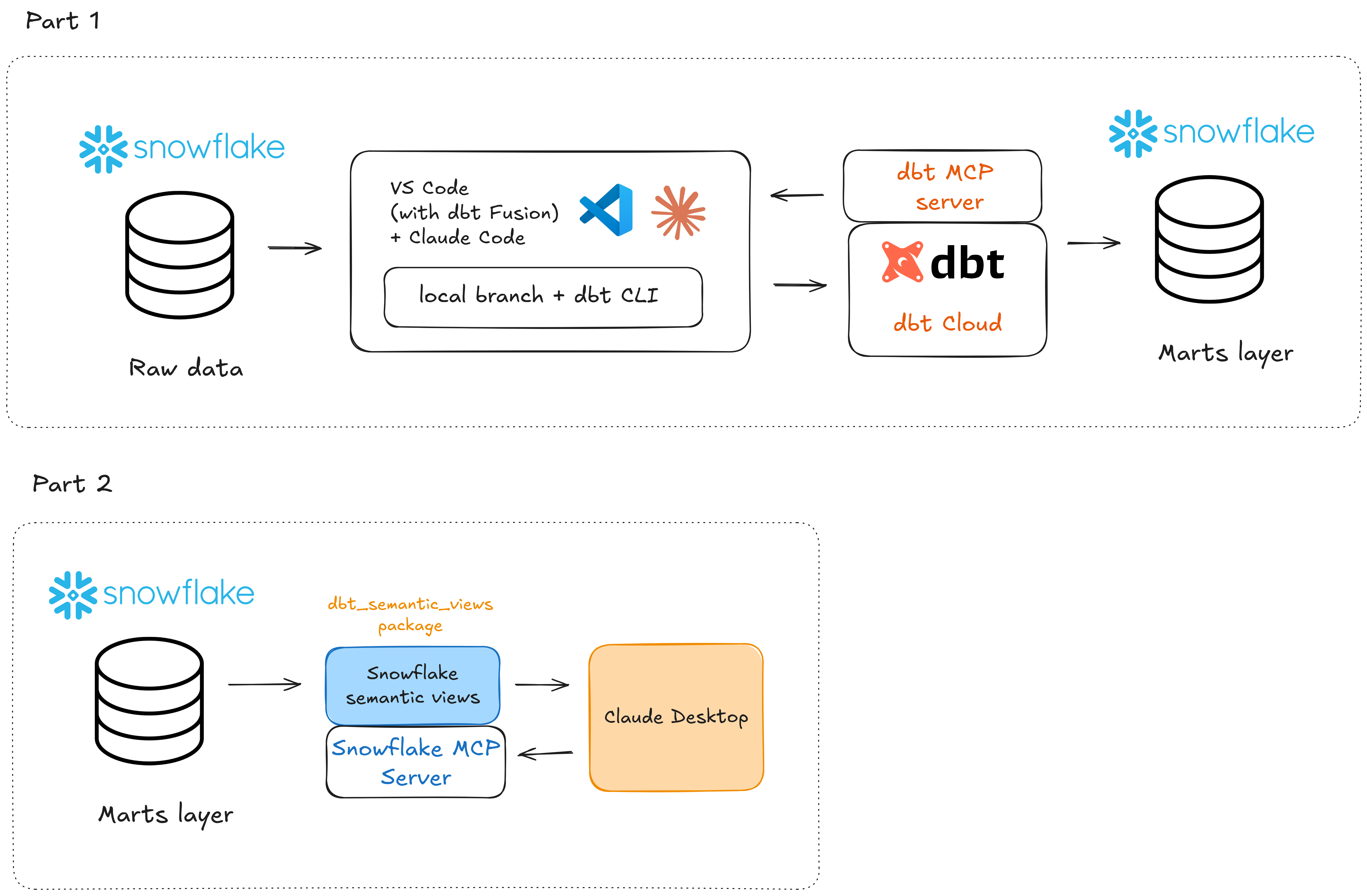
In Part 1, we rapidly built a feature to our dbt project with Claude Code. We defined sources, built staging and mart models, wrote tests, and generated documentation all by just chatting with Claude.
In Part 2, we'll build metrics and a semantic layer on top of our models, connect to it via MCP (Model Context Protocol), and explore how AI agents can interact with our data and project natively. The goal is to make sure our dbt project is not just well-built, but queryable and actionable by AI.
We're using the same tech stack that was already outlined in the previous post:
2. What’s a Semantic Layer Anyway?
The idea of a semantic layer is not new. It's been around in the data world for decades, going back to BI tools like Business Objects and MicroStrategy in the 90s.
The idea is simply as follows: a semantic layer sits between your physical data and your applications and defines business meaning for your data:
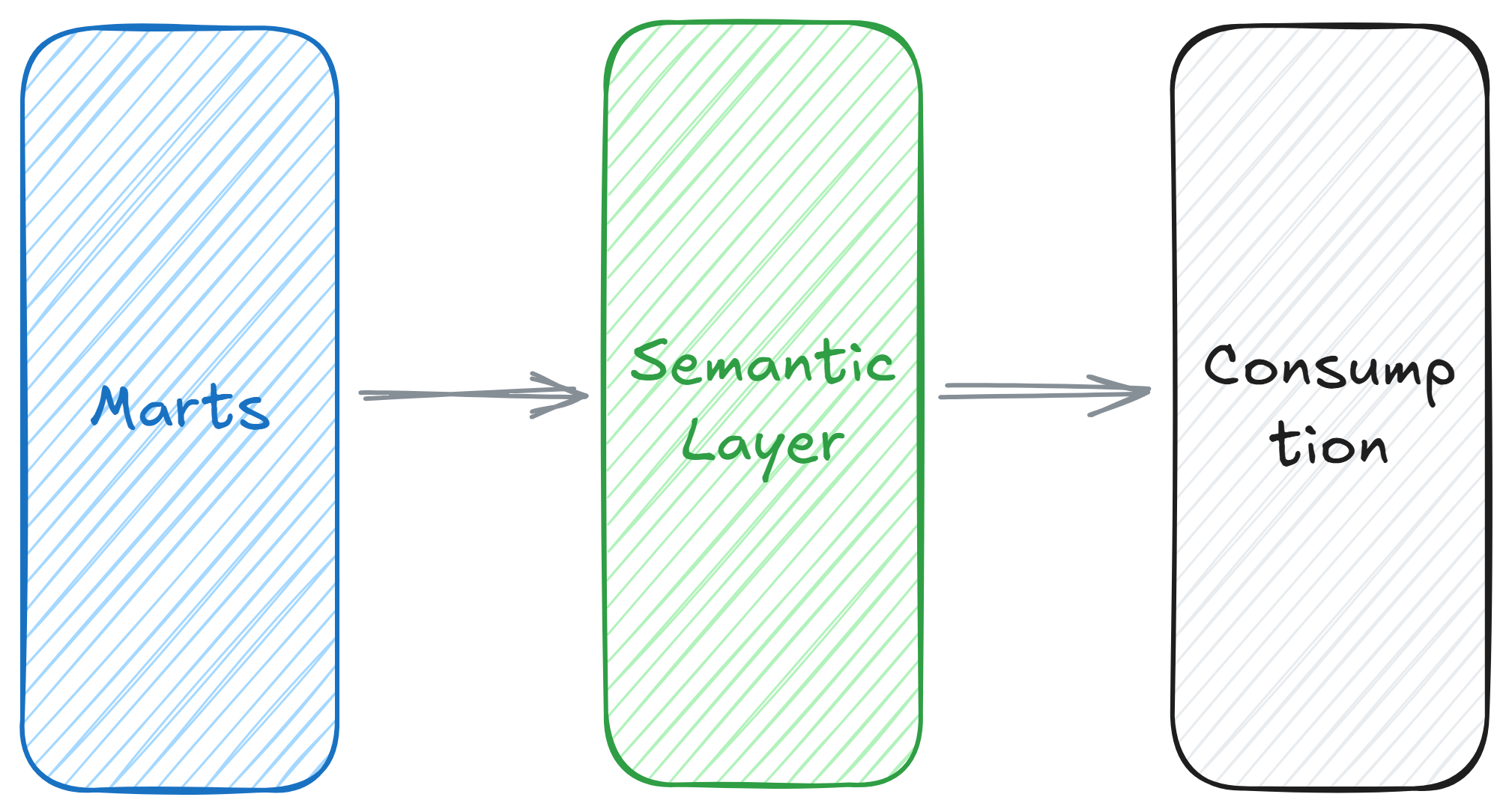
Without a semantic layer every application or a person consuming it is left to figure out metrics on their own. This leads to the classic problem of different people calculating a key company metric, revenue for example, in multiple different ways.
The semantic layer solves this by providing a single source of truth for business metrics, eliminating ambiguity and improving trust in the data.
But why is the semantic layer causing all this buzz right now?
Well you guessed it: AI and agents. Large language models are good at generating code and trying to find solutions, but they don't inherently understand your business. Without well-defined metrics, an AI agent might join the wrong tables, misinterpret a status field, or hallucinate numbers that don’t exist. The semantic layer acts as a guardrail which tells the agent exactly what metrics like total revenue, customer amount or order-to-delivery lead time actually mean.
3. Creating the Semantic Layer
Before going deep into the technicalities, it’s good to note that dbt and Snowflake both have their own implementation of the semantic layer.
dbt Semantic Layer uses yaml-files inside a dbt project. Snowflake uses SQL-based semantic views inside the data warehouse. To enable the use of their solution natively inside dbt, Snowflake launched a new package: dbt_semantic_view. For the time being, it seems that for AI applications Snowflake’s semantic layer solution is a better fit due to their strong Cortex ecosystem and native access to data and governance. And that’s why we’ll be using the dbt_semantic_view package in the rest of this post.
Ok, enough with the theory. Let’s build!
Just as a refresher, our DAG and models look like this after the first part of the blog post:

So what we want to do now is to build a semantic layer on top of our customer delivery metrics model.
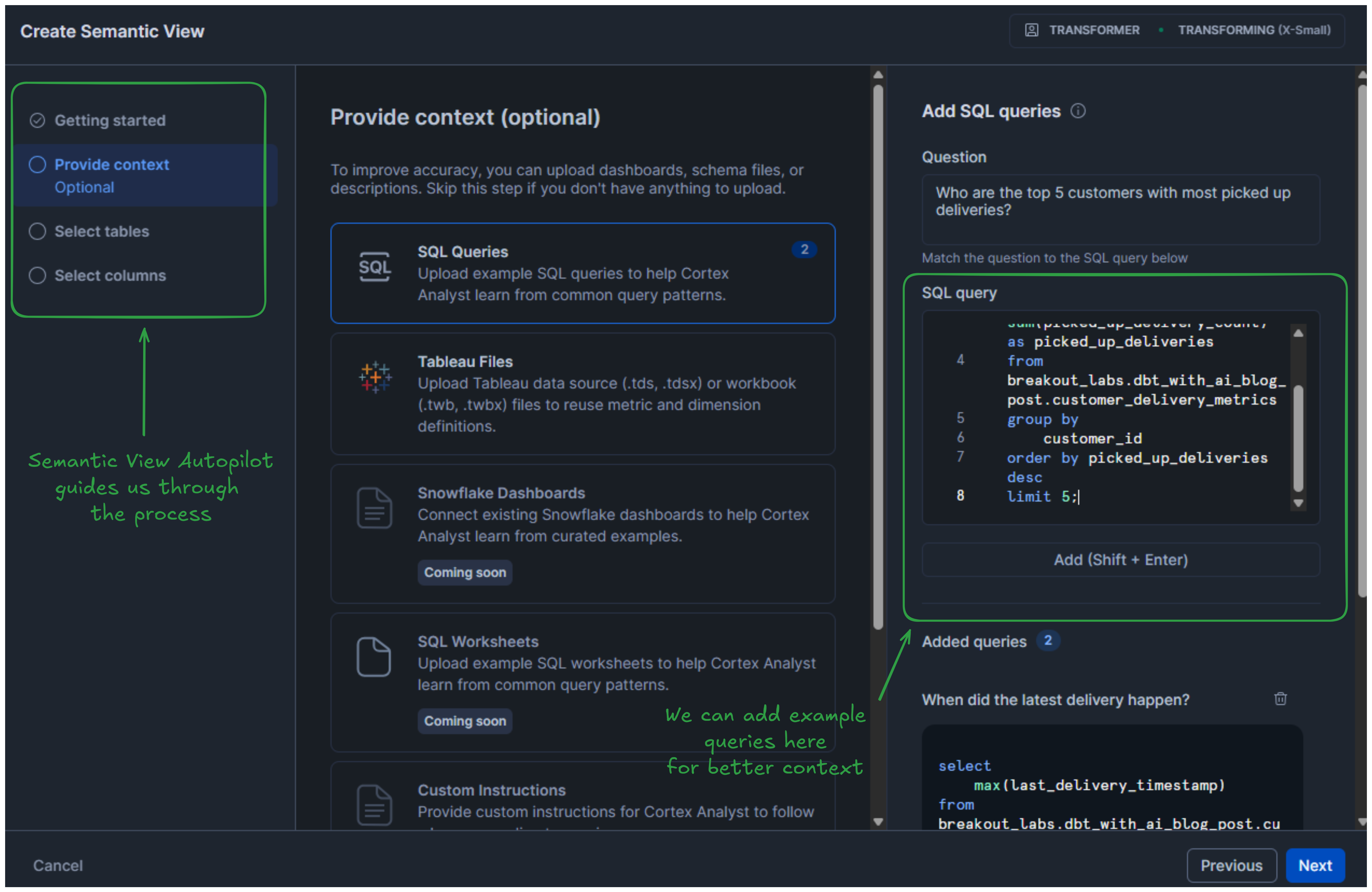
First, let’s open Snowflake’s Cortex Analyst, and click Create new → Create new Semantic view. The Semantic View Autopilot will start guiding us through the process.
We’ll have to enter a name and a description for the semantic view. Next, we want to provide some context. Here, it’s possible to attach example SQL Queries, Tableau Files, Snowflake Dashboards, SQL Worksheets etc. to help Snowflake better understand the context of the semantic view.
We’ll add 3 example queries for now:
After clicking through next a couple of more times, Snowflake creates the semantic view. However, for now we just kind of manually created this in Snowflake, and it’s not yet part of our dbt project pipeline. To fix this, we can first install the dbt_semantic_view package to our dbt project and then create the semantic view as an SQL-file.
Let’s grab the semantic view DDL by locating the view in Snowflake’s Catalog. Then, we’ll copy and paste this DDL definition in dbt. We need to do a couple of changes to really make it work, such as removing the create table statements, replacing the hardcoded refs and ideally improving the JSON appearance.
In the end we get something like this:
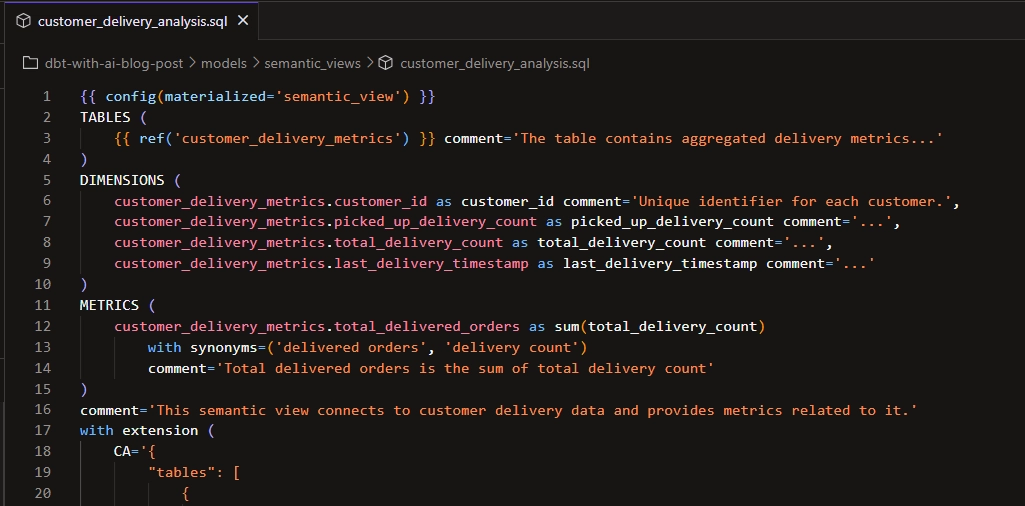
And we can also see in our dbt project that the semantic view becomes part of our DAG:
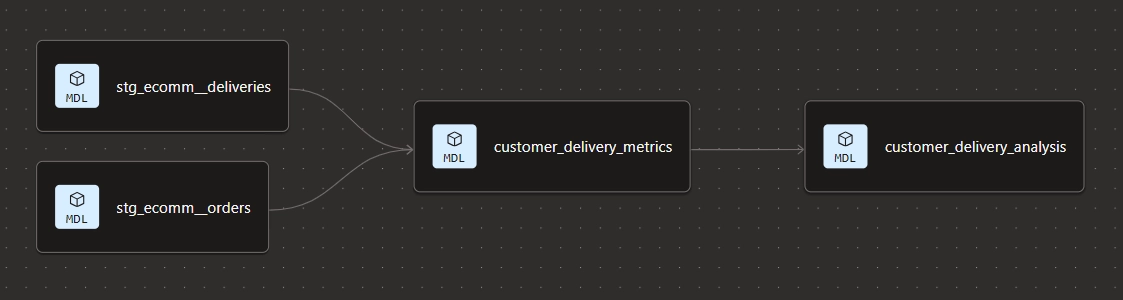
4. Conversational Analytics
Now that we have the semantic layer in place, we can get to the really exciting stuff!
Instead of writing SQL queries manually, we can just ask questions in plain English and get accurate answers. So let’s hook up our semantic layer with Claude Desktop via Snowflake MCP.
The Model Context Protocol (MCP) is an open-source standard introduced by Anthropic that allows AI models to seamlessly connect with external data, tools, and software systems. You can think of it a bit like an universal USB-C for LLMs, enabling them to securely query databases, read files and use APIs without custom integration for every new tool.
To set this up, we need two configuration files in place: snowflake-mcp-config.yaml, which defines some Snowflake MCP parameters, and claude_desktop_config.json, which tells Claude Desktop how to connect to the Snowflake MCP server. I’m not going into the nitty gritty details of how to get it working, but there are some nice guides available to help you in that.
We should now be able to chat with our data via Claude Desktop and get accurate results without hallucinations. Let's test it. We can for instance ask:
Can you graph the total number of deliveries in the different delivery status categories so that we can better understand the delivery performance?
Claude starts querying the semantic view:
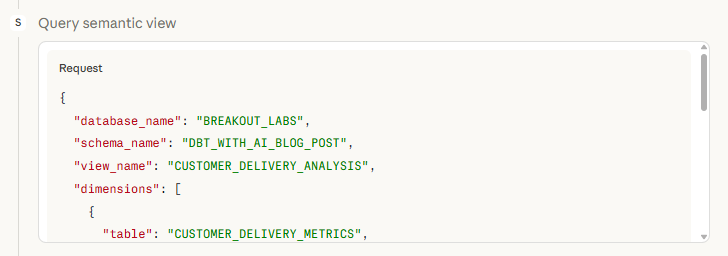
And sure enough, it responds quite quickly and we get a nice clean graph along with some additional observations:

Let’s ask another question:
Can you also chart the total delivery count by customer id as a horizontal bar graph? The customer with most deliveries being on top.

This is the part that genuinely changes how you can work with data. The semantic layer acts as the translation layer between human language and the warehouse, and Claude is the interface.
Imagine all the business people using Claude to ask all their data related questions, instead of bugging the analytics engineer! Also, for quick ad hoc visualizations there’s no need to whip up a separate report, just let Claude build it.
5. Summary
Let's take a step back and reflect on what we built and what we learned.
In Part 2, we extended our dbt project with a semantic layer using Snowflake's Semantic Views and dbt’s dbt_semantic_view package. We then connected Claude Desktop to the Snowflake MCP server and showed how natural language questions can return accurate, verified results against our data along with some ad hoc graphs for better understanding of the data.
Some key takeaways from this part:
- The semantic layer is the foundation for AI-powered analytics. Without well-defined metrics, AI agents are left guessing. Defining your business logic in a semantic layer means the AI has a reliable map to navigate your data. It removes ambiguity and replaces it with trust.
- dbt and Snowflake complement each other well in the semantic layer. Using the
dbt_semantic_viewpackage means the semantic view becomes a first-class citizen in your dbt DAG: version controlled, testable, and part of the same workflow as the rest of your models. - Self-service and conversational analytics is already here. I connected Claude Desktop to Snowflake via MCP and asked plain English questions. Got accurate results and ad hoc visualizations back instantly. No SQL, no BI tools, no waiting.
- Access to data is being democratized. No longer do you need to bug the analytics engineer or learn SQL to query or visualize your data fast. Just use plain English and watch the magic happen!
To recap everything from this blog series: we built our project with AI in Part 1 and enabled it for natural language analytics in Part 2. We have showed that already today we can both speed up our development process considerably with AI, but at the same time we need to make sure that our data projects are ready to be consumed both by humans and AI agents.
It’s a shift that is already happening and will become table stakes in most companies in the near future. Are you ready for it?
💡Ready to integrate AI into your team’s dbt workflows? We’re launching a brand new dbt with AI -course. Contact us to learn more!